Invasive AI

Some years ago there was one of those news programs that sent a reporter out with his cell phone powered down. He drove to a bunch of places, spending a little time at each. He came back to the lab where there was equipment that intercepted and interpreted the cell signal, and when he turned the phone on it transmitted the Date, Time and GPS Coordinates of the places he was at back to the Mother Ship...when his phone was turned off. I believe it was an Android and not an iPhone.
They will 'fix' the androids soon, I bet.
 
I just read this notice online this morning, and it was (looked to be) for the Homeland Security people to do, but it seems like something we would all want to do.
This is for people who have an Apple Device, but there might be something equivalent if you have a different kind of phone/tablet; so you might want to check your settings and see.

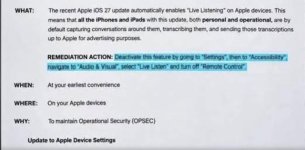
Basically, it said that the new iOS lets Apple listen in on any conversations, supposedly for advertising information, and this is how you turn it off on your Apple devices. I checked on my iPad and turned it off, so it is pretty easy to do.
You just go to settings/accessibility, then scroll down to audio/visual, and select “live listen” , and turn off “remote control”.


IMG_2008.jpeg
 
I just read this notice online this morning, and it was (looked to be) for the Homeland Security people to do, but it seems like something we would all want to do.
This is for people who have an Apple Device, but there might be something equivalent if you have a different kind of phone/tablet; so you might want to check your settings and see.

Basically, it said that the new iOS lets Apple listen in on any conversations, supposedly for advertising information, and this is how you turn it off on your Apple devices. I checked on my iPad and turned it off, so it is pretty easy to do.
You just go to settings/accessibility, then scroll down to audio/visual, and select “live listen” , and turn off “remote control”.


View attachment 6508

Since they "automatically enabled" this, I wonder if they will simply "automatically enable" it again.
 
I just read this notice online this morning, and it was (looked to be) for the Homeland Security people to do, but it seems like something we would all want to do.
This is for people who have an Apple Device, but there might be something equivalent if you have a different kind of phone/tablet; so you might want to check your settings and see.

Basically, it said that the new iOS lets Apple listen in on any conversations, supposedly for advertising information, and this is how you turn it off on your Apple devices. I checked on my iPad and turned it off, so it is pretty easy to do.
You just go to settings/accessibility, then scroll down to audio/visual, and select “live listen” , and turn off “remote control”.


View attachment 6508

I have a lot of my apps already turned off that I do not use. When I get a new phone, I usually delete a lot of the apps that they put on my iPhone if I have no use for them so they aren't running in the background. I recheck my apps after updates to make sure they didn't turn things back on.
 
I just read this notice online this morning, and it was (looked to be) for the Homeland Security people to do, but it seems like something we would all want to do.
This is for people who have an Apple Device, but there might be something equivalent if you have a different kind of phone/tablet; so you might want to check your settings and see.

Basically, it said that the new iOS lets Apple listen in on any conversations, supposedly for advertising information, and this is how you turn it off on your Apple devices. I checked on my iPad and turned it off, so it is pretty easy to do.
You just go to settings/accessibility, then scroll down to audio/visual, and select “live listen” , and turn off “remote control”.


View attachment 6508
I think there is some internet hyperbole about this function, although I trust no one. And those who write the "no big deal" articles might be one of "them." ;)

This function has been around since 2014. It allows you to use the iPhone as a microphone that transmits to Air Pods if they are registered on the same Apple account AND are within BlueTooth range of the phone. So you could use your phone in conjunction with AirPods are a crude hearing aid/amplifier. Or you could put your phone near someone giving a lecture and listen on your AirPods at the back of the room (as long as you are still within BlueTooth range.) Or you could use it as a baby monitor. A transcript is created that you can rewind on the fly.

According to the articles, the only way for someone else to listen in is if they (a) log into your Apple account (b) use Remote Control and (c) are within BlueTooth range. Other than hacking into your account or deciphering BlueTooth transmissions, the only potential eavesdropping risk would be for you to put your phone in a room where people are having a conversation, so you could listen on your AirPods if you are within Bluetooth range...or having someone do that to you. Eavesdropping is illegal.

I am assuming that the transcript is created on the iPhone, the same as it can do for phone calls and voice mails. Remote access to the transcript would be the only concern I would have, but I believe it's all done local. That being said, if this feature is always On, would it be consuming battery power (because it is always transmitting)?
 
Back
Top