I just read this notice online this morning, and it was (looked to be) for the Homeland Security people to do, but it seems like something we would all want to do.
This is for people who have an Apple Device, but there might be something equivalent if you have a different kind of phone/tablet; so you might want to check your settings and see.
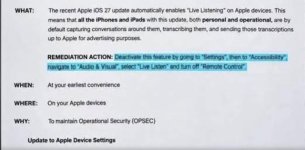
Basically, it said that the new iOS lets Apple listen in on any conversations, supposedly for advertising information, and this is how you turn it off on your Apple devices. I checked on my iPad and turned it off, so it is pretty easy to do.
You just go to settings/accessibility, then scroll down to audio/visual, and select “live listen” , and turn off “remote control”.
View attachment 6508