MacBooks and laptops

Speakin'a computers ....... I have had this lap-top since 2012, and am considering a new one. This one is sometimes painfully slow, and sometimes does nothing for mulitple hours. And on top of that I get [need to log off for maintenance etc], about every-other week.

So .... with that in mind, what would be the recommendation to purchase from the group here ?
 
Did that video recommend using iTunes? That's what I read when I got my iPhone but I read that it's been discontinued.
I’m not sure I’ll look if I forwarded it to my own mailbox …or just directly into hubs ….. yes it mentioned attaching a cable and hubs tried it on his
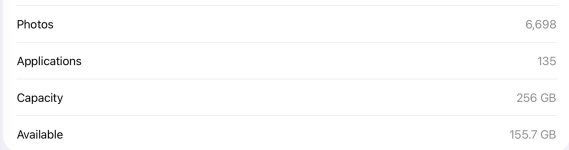
iPad / laptop and the photo showed as little icons …not actual photos

I’ve got iTunes on my very old laptop but never got around to putting it in my newish L T ….as yet
@John Brunner @Yvonne Smith
 
Speakin'a computers ....... I have had this lap-top since 2012, and am considering a new one. This one is sometimes painfully slow, and sometimes does nothing for mulitple hours. And on top of that I get [need to log off for maintenance etc], about every-other week.

So .... with that in mind, what would be the recommendation to purchase from the group here ?
It totally depends on what you are looking for in a computer, as to which one might work best. That is kind of like telling us you need a new vehicle , and which one do we recommend.
You might need a truck, a station wagon, a minivan or a sports car depending on what you do with the vehicle, so the same thing is true with a computer. We need more info to help out , @Buck.

Personally, I got my first iPad around 2011 when they first came out, fell in love with it, and that is all I ever use, with upgrades over the years, of course.
I have a 13” iPad Pro with an attached keyboard, and it does everything I need or want to do. With the Apple Pencil, I am also able to do art programs with the iPad. My husband uses the same setup and it works for him, too.

If you want a basic computer that is really easy to run and cheap, there are Chromebooks. They run on google operating systems and store everything in the google cloud, so they do not have a large memory storage in the laptop itself.
They come in several sizes and with or without a touchscreen. But, if you need to do something that requires internal storage, you have to get the external memory cards and use that for storage.

Another thing is what kind of a phone do you have ? Getting a computer that works with your phone is also helpful, so you can transfer data from the phone to the laptop easily and sometimes automatically.
I am guessing that if you have had the same laptop since 2012, it probably runs windows, and people have said that they had a hard time with going from an older windows program to the newer ones, and for that reason they change over to a Chrome book or a MacBook.
 
Last edited:
The issue with dumping photos from an Apple device to a Windows device is Apple's "proprietary" file types. I think Apple photos are "HEIC" format or something like that, and need to be converted to JPEG or whatever.
 
Found it ……

I’d sent it to myself .

That's how I transfer stuff from my iPhone to my laptop. The laptop sees the Apple device as any other external storage device. Sometimes you gotta plug it in and unplug it a couple of times for the laptop to see it. Sometimes you need to go to the Photos folder in the Apple device to get the Allow screen to appear. Also, you need to search the laptop's File Explorer folder list to find the Apple device. I think I scroll up to the User Name and click it...that Applek device folder can seem buried.

iTunes is (was?) for moving photos from the laptop to the Apple device.
 
We are away till mid April ,and it’s bound to be chilly by the time we get home ….so it will be one of the jobs put on the to do ….real..soon list
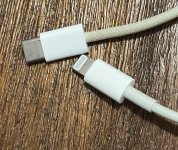
I’ll pass that info onto hubs about unplugging / replugging ..or maybe I’ll be brave enough to try it myself ….Ill ask if he’s got a spare lead or buy one ..think the one he has …..has got an adaptor on the end so you can use it for different size …my phone ….which is a …version 6 …has a diffrent size ….style …plug to my iPad 10 @John Brunner

Hubs knows what they are called ….and read Apple are planning on going back to the same size plugs …...latter this year ..
IMG_2617.jpeg
 
We are away till mid April ,and it’s bound to be chilly by the time we get home ….so it will be one of the jobs put on the to do ….real..soon list
I’ll pass that info onto hubs about unplugging / replugging ..or maybe I’ll be brave enough to try it myself ….Ill ask if he’s got a spare lead or buy one ..think the one he has …..has got an adaptor on the end so you can use it for different size …my phone ….which is a …version 6 …has a diffrent size ….style …plug to my iPad 10 @John Brunner

Hubs knows what they are called ….and read Apple are planning on going back to the same size plugs …...latter this year ..
View attachment 1309
Make sure you search real hard for your Apple device in your laptop File Explorer, too. Go all the way to the top and expand the top-level main folders. It can be sort of buried. If I had my laptop back from repair, I'd try it and tell you exactly where it is.
 
It totally depends on what you are looking for in a computer, as to which one might work best. That is kind of like telling us you need a new vehicle , and which one do we recommend.
You might need a truck, a station wagon, a minivan or a sports car depending on what you do with the vehicle, so the same thing is true with a computer. We need more info to help out , @Buck.

Personally, I got my first iPad around 2011 when they first came out, fell in love with it, and that is all I ever use. I have a 13” iPad Pro with an attached keyboard, and it does everything I need or want to do. With the Apple Pencil, I am also able to do art programs with the iPad. My husband uses the same setup and it works for him, too.

If you want a basic computer that is really easy to run and cheap, there are Chromebooks. They run on google operating systems and store everything in the google cloud, so they do not have a large memory storage in the laptop itself.
They come in several sizes and with or without a touchscreen. But, if you need to do something that requires internal storage, you have to get the external memory cards and use that for storage.

Another thing is what kind of a phone do you have ? Getting a computer that works with your phone is also helpful, so you can transfer data from the phone to the laptop easily and sometimes automatically.
I am guessing that if you have had the same laptop since 2012, it probably runs windows, and people have said that they had a hard time with going from an older windows program to the newer ones, and for that reason they change over to a Chrome book or a MacBook.
My newish laptop with windows 11 confuses me …think that’s why, I’ve never taken the time to use it more ….dah ..I’d learn better if I used it wouldn’t I 🤣…. and because I’ve used iPads for quite a long time it’s different finding sections I want …. I’m fine with it for word processing / I recently used publisher to make something for a friend who’s left our area and moved to the city ( she wanted change if address cards to give out to doctors and anywhere she’s been known locally for over 85 years ) so no issues doing that on my newish L T
 
Make sure you search real hard for your Apple device in your laptop File Explorer, too. Go all the way to the top and expand the top-level main folders. It can be sort of buried. If I had my laptop back from repair, I'd try it and tell you exactly where it is.
No rush as I mentioned John ..we are not home till mid April ….let me know when you get it back
And thanks for your help …
 
Speakin'a computers ....... I have had this lap-top since 2012, and am considering a new one. This one is sometimes painfully slow, and sometimes does nothing for mulitple hours. And on top of that I get [need to log off for maintenance etc], about every-other week.

So .... with that in mind, what would be the recommendation to purchase from the group here ?
As Yvonne said, it depends on what you need to do. I'm going to the Apple platform because I don't like the intrusive direction that Microsoft is going with WIN11...plus folks think the interface is confusing.. My main requirements are to have external monitor and keyboard, to run MS Office, and to have enough memory for multiple open browser tabs... and to not break the bank.
 
As Yvonne said, it depends on what you need to do. I'm going to the Apple platform because I don't like the intrusive direction that Microsoft is going with WIN11...plus folks think the interface is confusing.. My main requirements are to have external monitor and keyboard, to run MS Office, and to have enough memory for multiple open browser tabs... and to not break the bank.
Apple also has refurbished Apple products, which come with the full apple warranty, @John Brunner . You might check some of those out if you want more of your requirements and not the price of having that in the newest model. My Gurus (kids) always check there for good buys , and it is probably better than even buying the amazon renewed devices.

If you were just getting a new Neo, that is one thing, but if you are looking for a higher end laptop, then it might be worth checking out the apple refurbished website, to get the extra options and still stay in budget.

 
Good idea , @Yvonne Smith Apple usually ask if you have a trade in and you can look up on their site to get an approx trade in value of your device , so many of their refurbished items are thoroughly checked / serviced trade ins by customers who are upgrading .

I’m sorta thinking about maybe getting a newer watch latter this year …
 
Since this is the Laptops and MacBooks thread, I will say that while I like my MacBook Pro and plan to always have something more mobile than a desktop but with a larger screen than a tablet, it is not the computer I use most. Mostly, I use my Mac mini with a large screen, and if I had a bigger desk, I might get a larger screen. To me, a tablet is for reading books, and for that, I would prefer something built for books, like a Kindle or a Kobo. I have several other computers, including a Windows desktop, a Windows laptop, a couple of Linux desktops, and even a Raspberry Pi, but I rarely boot the others up. I do use the MacBook Pro quite a lot because it's the one I take when traveling, and otherwise I leave it at my desk upstairs, so if I'm up there, I'll use it. I once bought a new Chromebook because I had left my MacBook at home while on vacation, so I thought I could get by with it for a week. However, I hated it so much that I bought a new MacBook Pro in Virginia, even though I already had another MacBook at home, and gave the Chromebook to my sister-in-law. She's still using it, so not everyone hates them.
 
Speakin'a computers ....... I have had this lap-top since 2012, and am considering a new one. This one is sometimes painfully slow, and sometimes does nothing for mulitple hours. And on top of that I get [need to log off for maintenance etc], about every-other week.

So .... with that in mind, what would be the recommendation to purchase from the group here ?

Since you have had your laptop since 2012, you probably don't do much in the way of power computing, gaming, etc. If you mainly use your laptop for internet browsing, email, etc. I'd say buy an inexpensive chromebook. They are intuitive to operate and reasonably priced. The biggest drawback is that there's usually not a lot of storage space, so if you have a lot of large files, photos, etc. you might need a regular laptop.
 
Since this is the Laptops and MacBooks thread, I will say that while I like my MacBook Pro and plan to always have something more mobile than a desktop but with a larger screen than a tablet, it is not the computer I use most. Mostly, I use my Mac mini with a large screen, and if I had a bigger desk, I might get a larger screen. To me, a tablet is for reading books, and for that, I would prefer something built for books, like a Kindle or a Kobo. I have several other computers, including a Windows desktop, a Windows laptop, a couple of Linux desktops, and even a Raspberry Pi, but I rarely boot the others up. I do use the MacBook Pro quite a lot because it's the one I take when traveling, and otherwise I leave it at my desk upstairs, so if I'm up there, I'll use it. I once bought a new Chromebook because I had forgotten my MacBook while on vacation, so I thought I could get by with it for a week. However, I hated it so much that I bought a new MacBook Pro in Virginia, even though I already had another MacBook at home, and gave the Chromebook to my sister-in-law. She's still using it.

I had kind of the opposite experience; I've been a Windows OS person since the 1980s, so moving to a MacBook was a nightmare. I regretted this purchase every single day and I still get annoyed with it.

I think e-readers (Kindle, etc) are the best for reading, but they SUCK at organizing massive numbers of books. I actually prefer using a tablet (iPad, Fire, etc.) to access my Kindle library. The color display and interface on a tablet is such a step up from a Kindle.

I never cared for a Chromebook because I usually want to load stuff on to a laptop or need more storage, plus I hate the intrusiveness of Google. Which is silly because it's no more intrusive than Apple or Microsoft but I really hate Google.
 
Since this is the Laptops and MacBooks thread, I will say that while I like my MacBook Pro and plan to always have something more mobile than a desktop but with a larger screen than a tablet, it is not the computer I use most. Mostly, I use my Mac mini with a large screen, and if I had a bigger desk, I might get a larger screen. To me, a tablet is for reading books, and for that, I would prefer something built for books, like a Kindle or a Kobo. I have several other computers, including a Windows desktop, a Windows laptop, a couple of Linux desktops, and even a Raspberry Pi, but I rarely boot the others up. I do use the MacBook Pro quite a lot because it's the one I take when traveling, and otherwise I leave it at my desk upstairs, so if I'm up there, I'll use it. I once bought a new Chromebook because I had left my MacBook at home while on vacation, so I thought I could get by with it for a week. However, I hated it so much that I bought a new MacBook Pro in Virginia, even though I already had another MacBook at home, and gave the Chromebook to my sister-in-law. She's still using it, so not everyone hates them.
If I had a spot in my living room, I could get by with a desktop. I built several back in the days of WIN95_WIN98. I do most of my browsing sitting on my couch with a wireless keyboard and a monitor on a small table. My laptop never goes anywhere.
 
Since this is the Laptops and MacBooks thread, I will say that while I like my MacBook Pro and plan to always have something more mobile than a desktop but with a larger screen than a tablet, it is not the computer I use most. Mostly, I use my Mac mini with a large screen, and if I had a bigger desk, I might get a larger screen. To me, a tablet is for reading books, and for that, I would prefer something built for books, like a Kindle or a Kobo. I have several other computers, including a Windows desktop, a Windows laptop, a couple of Linux desktops, and even a Raspberry Pi, but I rarely boot the others up. I do use the MacBook Pro quite a lot because it's the one I take when traveling, and otherwise I leave it at my desk upstairs, so if I'm up there, I'll use it. I once bought a new Chromebook because I had left my MacBook at home while on vacation, so I thought I could get by with it for a week. However, I hated it so much that I bought a new MacBook Pro in Virginia, even though I already had another MacBook at home, and gave the Chromebook to my sister-in-law. She's still using it, so not everyone hates them.
You can get a larger 13 inch iPad @Ken Anderson ……think my standard one is about 10 inch ..I’ve also got a mini 6 inch one I only ever use for taking photos when travling intestate

Pretty expensive but there’s always the possibility of picking up a refurbished one

Key Features of Large iPads
  • Performance: Equipped with fast Apple M-series chips (M2, M3, M4, or M5 depending on specific model and release) for multitasking, 4K video editing, and gaming.

  • Display: 13-inch models provide a "giant" canvas suitable for creative work, while 11-inch models are generally considered the "sweet spot" for portability versus screen size.

  • Accessories: Compatible with the Apple Pencil Pro and Magic Keyboard for enhanced productivity.
  • Battery: All-day battery life (up to 10 hours for web surfing, up to 18 hours for video in some models).
 
Back
Top